
Turn failed discount codes into completed checkouts.
See the revenue sitting behind invalid, expired, and mistyped discount codes - then recover the sale at checkout with a backup offer you control.
SUMMER20 has expired and can't be applied to this order.
Discount applied - your recovery code was applied to this order.
Still want a discount?
Simulated checkout. The real offer renders natively in Shopify Plus checkout via a checkout UI extension.
Every failed discount code is a signal, not just an error.
Shoppers arrive at checkout with real purchase intent and a code they believe should work - from an email, an influencer, a loyalty programme, or memory. When Shopify rejects it, many abandon. Most merchants never see how much revenue that leak costs.
High intent
A shopper builds a cart and heads to checkout expecting a deal. The cart has measurable value.
The code fails
Expired campaign, influencer typo, ineligible cart, deactivated code - Shopify shows a dead-end error.
The sale walks
Many discount-motivated buyers abandon at the last mile - the most expensive place to lose a conversion.
Nobody sees it
No report shows which codes customers expected to work, or how much cart value sat behind the failures.
From failed code to recovered order - automatically.
Native to Shopify: a web pixel and a checkout UI extension. No theme edits, and successful discount flows are never touched.
Detect
The web pixel watches checkout and records every failed attempt - the code tried, the failure reason, and the cart value at risk.
Decide
Your rules run: only offer when the failure looks genuine, cap offers per checkout, and never re-offer the code that just failed.
Offer
A recovery card appears in checkout with a backup code you choose - an Apply button, or auto-apply if that fits your brand.
Shopify PlusAttribute
Recovered orders are matched back to applied offers by checkout token - so recovered revenue is a defensible number, not a guess.
Plus-grade visibility. Merchant-controlled recovery.
Built for ecommerce managers and directors who answer for conversion rate, contribution margin, and clean reporting - not another vanity dashboard.
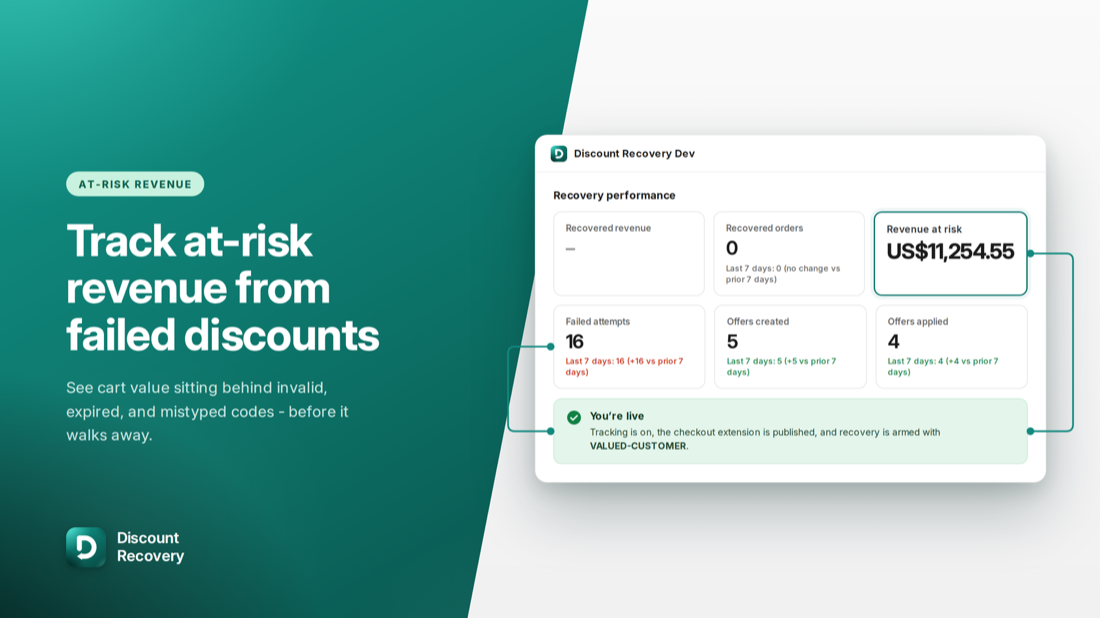
Put a board-ready number on the leak.
Every failed attempt is recorded with its cart value, so you know exactly how much revenue is exposed when codes fail - over the last 30 days, with week-over-week deltas for trading reviews.
- Recovered revenue and recovered orders, attributed by checkout token
- Revenue at risk, failed attempts, offers created and applied
- A recovery funnel: failed → offered → applied → recovered
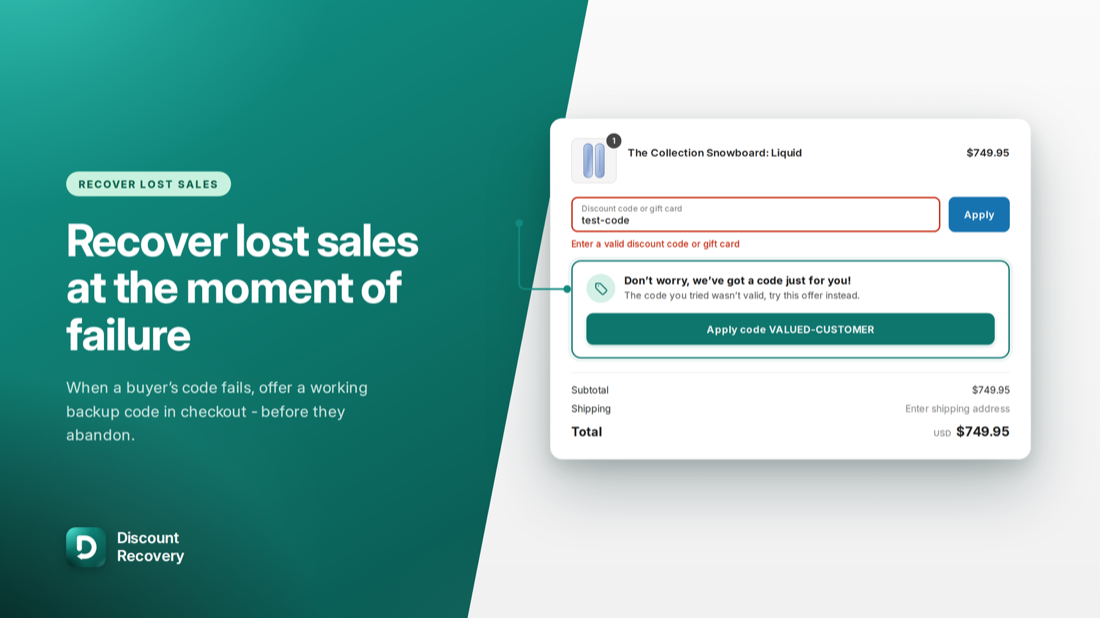
Replace the dead end with a second chance.
When a buyer's code fails in Shopify Plus checkout, present a backup offer you control. Keep it optional with an Apply button, or auto-apply when that fits your brand rules. Normal checkouts stay untouched - recovery only appears when a code fails.
- You choose the backup code - protect margin with a smaller offer
- Custom titles, messages, and confirmation copy
- Guardrails: genuine-failure-only offers, max offers per checkout
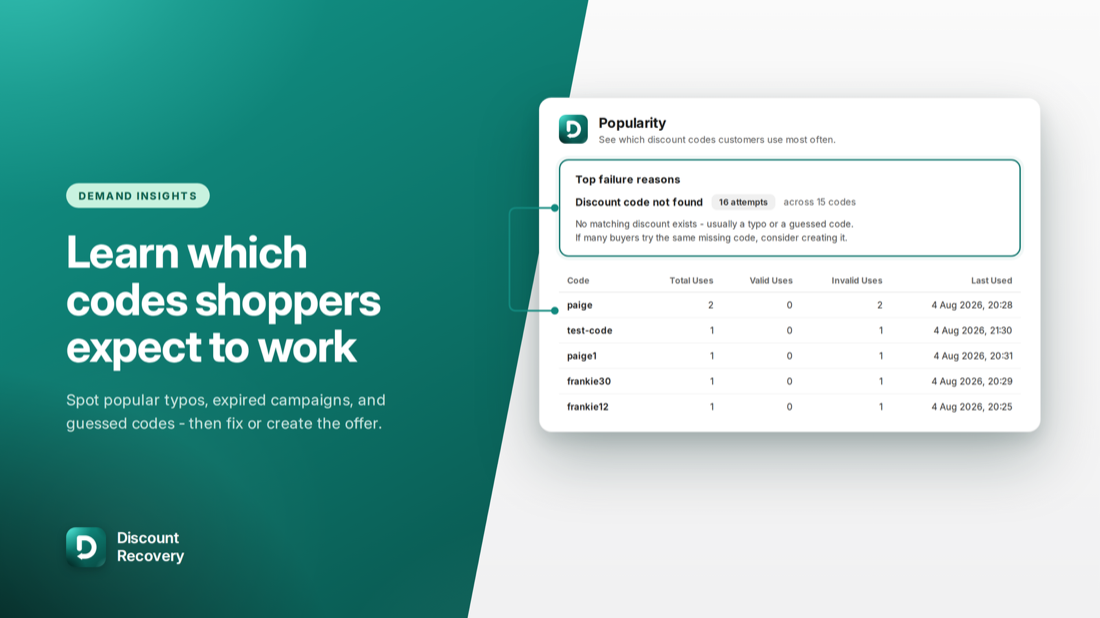
See which codes customers expect to work.
Popularity and failure-reason views turn "coupon not working" noise into demand intelligence. Spot influencer typos, ended campaigns customers still want, and eligibility friction - then create or fix the offers demand proves customers want.
- Top failure reasons: not found, expired, not active, rejected at checkout
- Full timeline of every attempt, cart value, and recovery offer
- CSV export for finance, BI, and offline analysis
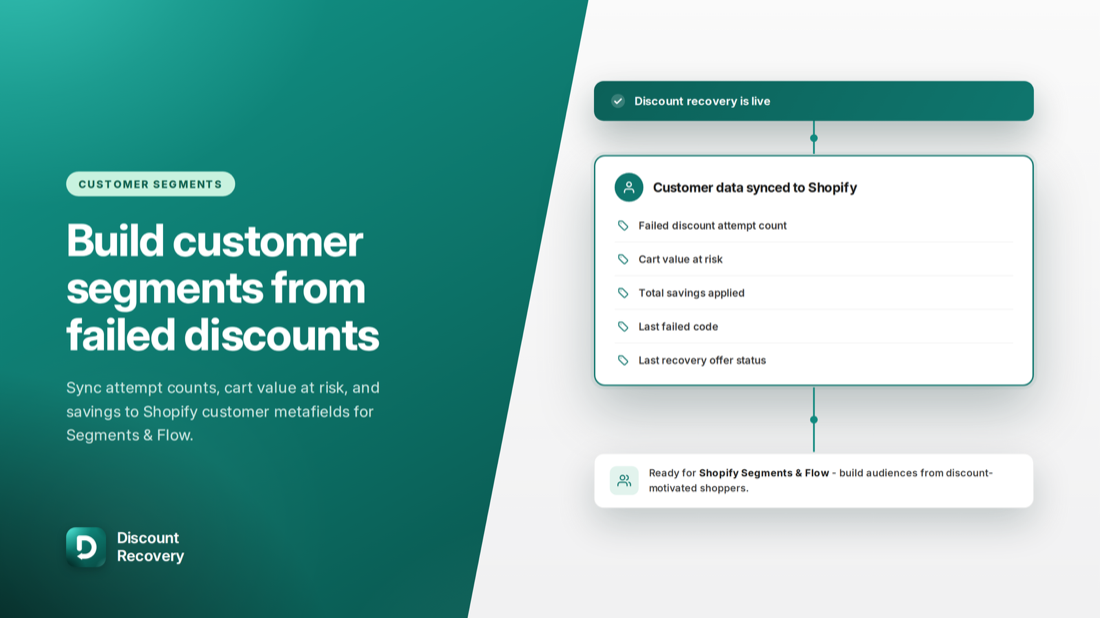
Turn discount intent into lifecycle marketing fuel.
Failed and successful discount behaviour syncs to Shopify customer metafields and tags - so Segments, Flow, and your email platform can act on it long after checkout.
- Win back buyers who were shown an offer but didn't use it
- Target high-cart-value near-converters; exclude serial code guessers
- Metafields include failed counts, cart value at failure, and last codes tried
How much is sitting behind your failed codes?
Run your own numbers. The app measures the real figures for your store from the moment tracking is installed.
Promo-heavy stores often see hundreds - the app counts yours precisely.
Your actual rate depends on your offer, rules, and customers - the funnel reports it.
Estimated revenue at risk / month
$30,000
Illustrative recovered revenue / month
$1,500
≈ 13 rescued orders / month at a 5% recovery rate
Recommended plan
Rescue - $48/mo
Covers up to 60 rescues - net $1,452/month after the plan cost, a 31× return.
Illustrative only - not a guarantee of results. Discount Recovery reports your store's actual failed attempts, at-risk value, and recovered revenue so ROI is measured, not modelled.
Priced on rescued orders - nothing else.
A rescue is a sale saved after a discount code fails. Every plan starts with a 7-day free trial - pick the one that covers your volume. All plans include full analytics - rescues pause when you hit your cap, tracking never stops.
Rescue
For stores ready to start recovering the sales they're already losing.
Up to 60 rescued orders / month
$0.80 per rescued order
- Always-on tracking & funnel analytics
- Recovery offers at checkout
- Targeting rules
Boost
Better per-rescue economics for stores running regular promotions.
Up to 180 rescued orders / month
≈ $0.72 per rescued order
- Everything in Rescue
- 3× the rescue capacity
- Priority support
Enterprise
The best per-rescue economics for high-volume stores.
Up to 500 rescued orders / month
≈ $0.50 per rescued order - our lowest
- Everything in Boost
- Lowest cost per rescued order
- Concierge setup
Every rescue is a sale you'd otherwise have lost - at $0.50-$0.80 per rescued order, each plan pays for itself many times over. Need more than 500 rescues a month? Get in touch about custom volume pricing.
Billed through Shopify
Every plan is managed by Shopify App Billing - charges appear on your regular Shopify invoice and you can cancel or change plans anytime from your admin.
Not on Shopify Plus?
Tracking and analytics work on any plan from the moment the pixel is installed. Checkout recovery offers require Shopify Plus, which enables checkout extensibility.
Development stores
Dev and partner test stores can evaluate the app without a subscription - ideal for agencies validating the fit before rollout.
Questions Plus operators ask.
Isn't this just another discount app?
No - Discount Recovery isn't a coupon creator. It's recovery and visibility for failed codes at checkout: it measures the revenue at risk behind failed attempts and, when you choose, offers a backup code so the order can still complete. Your existing discount tooling stays exactly as it is.
Will it train shoppers to type garbage codes for a discount?
The default rules protect against this. "Only offer when the failed code looks genuine" limits offers to expired or known codes rather than random guesses, and the maximum offers per checkout defaults to 1 (configurable 1-5). The app also never re-offers the same code the buyer just failed with.
Will it hurt our margin?
You choose the backup code, so you control the economics. Best practice is a dedicated recovery code (for example WELCOME-BACK) that's slightly smaller than your primary promotions - recovered orders are tracked separately so you can see exactly what the offer costs and returns.
Does it slow down checkout?
No. The extension only reacts when a discount code fails - successful discount flows and normal checkouts are untouched. There are no theme edits and no DOM scraping; everything runs through Shopify's native web pixel sandbox and checkout extensibility.
We're not on Shopify Plus - is it still useful?
Tracking and analytics work on any plan: failed attempts, revenue at risk, code popularity, failure reasons, and customer segments all populate from the moment the pixel is installed. Checkout recovery offers specifically require Shopify Plus, because they use checkout UI extensions.
How do we prove ROI to leadership?
Recovered orders are attributed to applied recovery offers by checkout token, so recovered revenue is a hard number, not an estimate. The funnel (failed → offered → applied → recovered) plus CSV export gives finance and BI everything needed for weekly trading reviews.
Do we need developers or theme work to set it up?
No theme edits and no code. Setup is: install the app, confirm the tracking pixel (usually installed automatically), add the "Discount Code Recovery" app block in the checkout editor, and set your backup code. The in-app checklist walks you through it - see the setup guide.
See at-risk revenue in your store this week.
Install Discount Recovery, and tracking starts the moment the pixel is live - before you arm a single recovery offer. 7-day free trial, cancel anytime.